
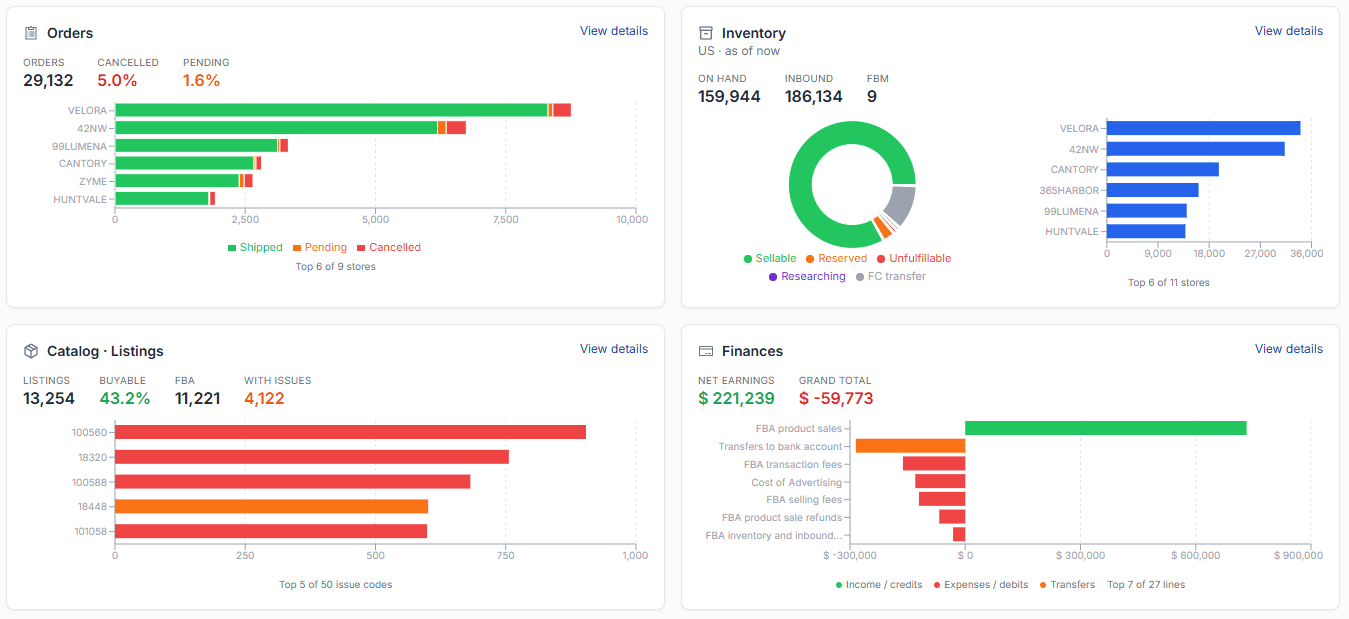
Built to help Amazon FBA POD sellers run a smarter operation
Spot what's breaking across finances, orders, listings, inventory, and ads. Fix them in the same place — optimize listings, plan FBA restocks, tune ad spend. No spreadsheets, no tab switching.
SP-API · ADS API
Amazon public APIs
US · CA · MX
Marketplaces
$0
During Beta
AES-256
Token encryption
Visualize your numbers
Sales, profit, TACOS, and store health in one dashboard — see the trend over time for every single SKU, not just today's number.
Insightful Analytics for Smarter Sales
Your catalog, audited every day
Thousands of listings. One page that shows which ones need attention — incomplete data, missing costs, or issues worth fixing first.
See your whole catalog at a glance
Every listing across every store in one dashboard: what's buyable, what's FBA vs FBM, what has issues, and what's still missing cost data. Break it down by store and by listing status without exporting a single report.
Know exactly which listings are falling short
Your best listing sets the bar. Every other listing in that product type gets measured against it — bullet points, images, attributes — so you see exactly what's missing and where.
Turn Amazon's error codes into a to-do list
Amazon's error data is precise, listing by listing. At catalog scale, that's thousands of rows. We group them into a handful of codes, ranked by impact — so you know which fix moves the most listings.
Catch risky keywords before Amazon does
Restricted words slip into titles and bullets easily — a supplier's copy, an old promo phrase, a claim you didn't write. We check every title, bullet and search term against Amazon's policy, score the risk, and put the risky ones at the top of your list.
Manage variation families without losing the thread
Variation families are where problems hide. See the full tree in one view — every child with its status, best-seller rank and FBA stock — and spot the inactive one that's quietly dragging down the whole family.
Every cost, accounted for
Fees, COGS, and everything in between — all in one place, so your profit numbers are complete.
Complete Financial Visibility
Stock in the right place, at the right time
See what you're holding, know what to reorder before you run dry, and track every inbound shipment — without a spreadsheet.
Know what you're holding
See where your money is sitting: how much stock you hold, how old it is, and how many days of cover is left. Dead stock and frozen capital surface on their own.
Know What to Restock, and When
How much to send, and when to send it — based on your own sale velocity over 7, 30 and 90 days. Restock advice that already knows your vendor's MOQ and lead time, so the quantity you see is a quantity you can actually order.
Inbound Shipments, Fully Tracked
Every inbound shipment in one list, with its current status and expected arrival. You'll know what's landing this week and what's still sitting at the vendor. Each shipment traces back to the restock plan that created it.
Ads that pay for themselves
See what your advertising returns in profit, find the search terms worth scaling, and fix the campaigns quietly draining budget.
Advertising Performance, End to End
Features & Benefits
Every cost, every listing, every campaign — in one dashboard.
Daily issue alerts
Listing health, issue codes, restricted keywords and variation families, rechecked every day across your whole catalog.
Profit & Cost Analysis
Add your COGS to the fees and refunds Amazon reports, and read net profit per SKU and per order.
Smart Inventory Forecasting
Stock predictions, reorder alerts and inventory value in dollars, so you know what to send and what it's costing you to hold.
Ads optimization on your rules
Write rules from impressions, clicks, spend and sales, preview every change, then apply. The optimizer suggests; you approve.
Shipment Tracking
Monitor inbound shipments with clear statuses and arrival forecasts, so you can plan replenishment proactively.
Team Access & Permissions
Share reports with unlimited team members through role-based permissions — everyone sees exactly what they need.
FREE for all Amazon Sellers during Beta
No hidden fees. No credit card required. All features unlocked.
Perfect for sellers in US, CA, MX marketplaces.
Who is this for?
FBA Print On Demand Sellers
Built for FBA POD sellers on the US, CA and MX marketplaces, where designs, variations and per-order costs add up fast.
Growth-focused Teams
Sellers tightening their daily routine — fewer manual steps, and every cost, fee and margin decision backed by your own numbers.
Operations & Staff
Owners sharing the work — role-based permissions give staff exactly the reports they need, with no access to anything else.
How It Works?
CONNECT YOUR AMAZON STORE
Create SellerBoxes Account
Let's get to know each other — our team will help you get set up.
SIGN UP NOWConnect Your Amazon Store
Authorize through Amazon OAuth — no passwords shared, and you pick exactly which API to connect.
MORE INFORMATIONStart Analyzing Your Sales
Our dashboard helps you track revenue, evaluate performance, and optimize strategy.
CHECK CATALOGFrequently asked questions
Answers about the Amazon integration, data safety, and supported marketplaces.
Is the Amazon integration really free?
Yes — the Amazon integration is completely free during our Beta. No credit card, no subscription, no hidden fees. Early users will get priority access to new features and discounts when pricing is introduced post-Beta.
Which Amazon marketplaces are supported?
North America: United States (amazon.com), Canada (amazon.ca), and Mexico (amazon.com.mx). EU and UK marketplaces are planned for after Beta.
How do I connect my Amazon store?
Go to Management → Stores and click Connect Amazon Store, then pick which API to authorize: SP-API (products, orders, inventory, finances) or Ads-API (advertising campaigns). Both use Amazon's official OAuth 2.0 — you grant access from your Seller Central account and we never see your password. Full step-by-step guide available in our Helpdesk.
Is my Amazon data safe?
Yes. OAuth tokens are AES-256-GCM encrypted at rest. We only read data needed for reports (orders, inventory, fees, ads), and we request Amazon order reports without buyer personal information — buyer names, addresses and contact details never reach SellerBoxes. You can revoke access anytime from your Amazon Seller Central settings.
Do you share or pool my data with other sellers?
No. Every metric you see is computed from your own account data only. We never pool it with other sellers, never benchmark you against them, and never sell or share it with third parties.
How does SellerBoxes work alongside Seller Central?
Seller Central stays your source of truth — you keep managing listings, orders and settings there. SellerBoxes reads that same data through the official APIs and adds a reporting layer on top: your US, CA and MX marketplaces side by side, plus the cost data only you have — COGS, MOQ, vendor lead times — so reports can show net profit per SKU, per order and per day.
Can I disconnect my Amazon store?
Yes, anytime. Go to Management → Stores, click the ⋮ icon in the Action column of that store, and choose Remove. We stop syncing immediately and delete your OAuth tokens from our database within 24 hours.
How the numbers are produced
Every figure in the reports is derived from your own account data. Here is where it comes from, how fresh it is, and what we do and don't do with it.
- Where the data comes from
- Your own Amazon account data, read through the Selling Partner API and the Advertising API, combined with the cost data you enter yourself — COGS, MOQ, vendor, lead times. No third-party or scraped data is mixed in.
- How profit is calculated
- Net profit is your Amazon-reported income minus the fees Amazon charges on the order, minus refunds, minus your advertising spend, minus the COGS you entered for that SKU. Change a COGS value and every downstream figure recalculates from it.
- Data freshness
- Figures reflect your most recent successful sync, shown in the app. Finance and advertising figures are finalised by Amazon over the following days, so the most recent days can still change as they settle.
- Forecasts are estimates
- Restock quantity, recommended ship date, days of cover, arrival forecasts and dead-stock signals are projections from your own sales history. Treat them as guidance for a decision you make, not as guarantees.
- Audits are rule-based
- Completeness compares each listing against your own most complete listing of the same product type. Keyword risk matches your copy against published Amazon policy wording. Both surface candidates for you to review; Amazon's own policy checks in Seller Central remain the authority on what is allowed.
- Buyer data and your data
- We request Amazon order reports without buyer personal information, so buyer names, addresses and contact details never reach SellerBoxes. And your account data is never pooled with other sellers', never used to benchmark you against them, and never sold or shared with third parties.
SellerBoxes is an independent tool built on Amazon's public APIs. It is not affiliated with, sponsored by, or endorsed by Amazon. Amazon, Seller Central, FBA and all related marks are trademarks of Amazon.com, Inc. or its affiliates. See our Privacy Policy for how we handle and retain data.
Join Amazon FBA POD sellers who tighten operations and sell smarter
Connect your Amazon store in 2 minutes. One daily workflow for listings, restocks and ads — with net profit per SKU across US, CA, MX marketplaces.
No credit card · Amazon SP-API and ADS API · Disconnect anytime